In short
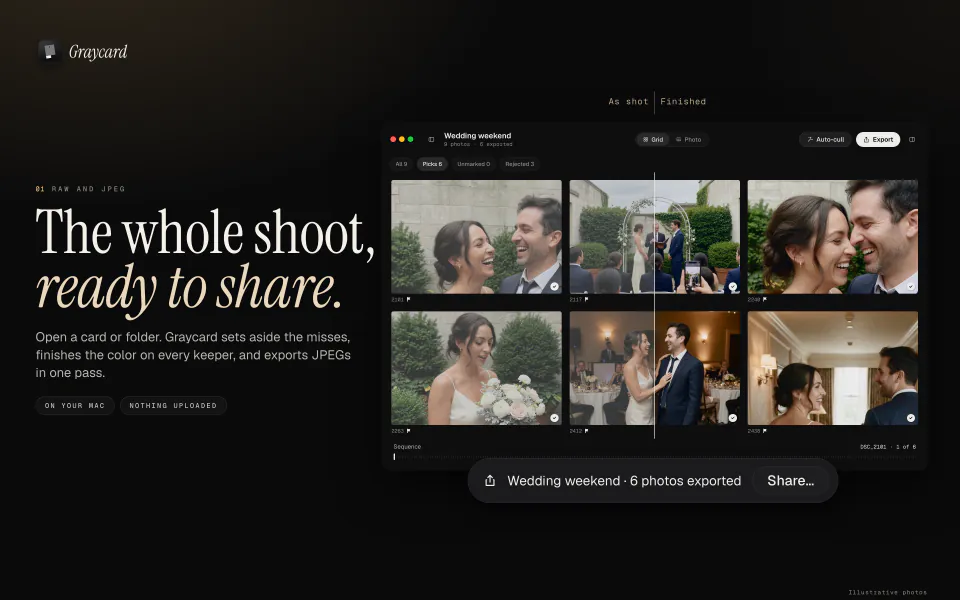
Cull, finish, export. The whole shoot, ready to share.
Graycard has been on the Mac App Store since October 9, 2026. It’s a RAW photo converter for the whole shoot: open a card or folder of RAW or JPEG, and Graycard sets aside the misses, finishes the color on every keeper, and exports JPEGs sized for messages, social, email, and print. Nothing is uploaded.
It’s free to download, with every tool, and your first 80 photos are free to export. Version 1.0.1 followed on October 13.
01Who it’s for
- Anyone back from a trip, a wedding, or a match day with a card full of photos.
- Anyone whose photographer handed over every photo from the day, on a drive or a download link. The guide to every photo from your photographer covers the free routes too.
- Photographers who owe a client a fast handover, graded, with their own marks in it.
02Keep the best
Press ⇧⌘K and Auto-cull reads each photo’s preview on your Mac. It sets aside blur, closed eyes, bad exposure, and the extra frames of a burst, and you see every one before it is marked. Nothing is deleted. How Auto-cull works goes through each check.
Then mark from the keyboard: 0–5 for stars, P to pick, X to reject, and U to unflag. The grid reads the previews the camera saved in each file, so a big folder opens without an import, and a RAW and its JPEG count as one photo.
03Finish the color
Graycard Auto, Graycard’s own color engine, balances faces, tone, and color on each photo, on your Mac, and the result stays natural. Twelve looks, from Light and airy to Dark and moody and Black and white, each have an intensity slider, and every look previews on your own photo.
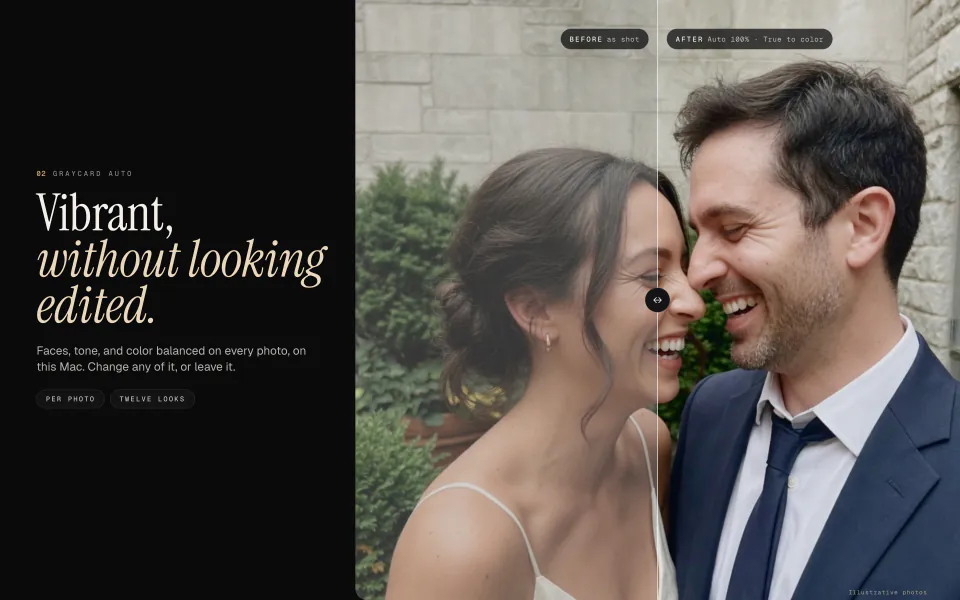
For a run under mixed light, lock one white balance across it as you export, or give every photo you kept one look with ⇧⌘C.
04Ready for wherever it goes
Press ⇧⌘E, choose a preset for where the photos are going, and Graycard writes the whole shoot to a folder you choose.
| Preset | Size | Location |
|---|---|---|
| For sharing | 2048 px on the long edge | Removed |
| Full size | Every pixel | Kept |
| Every pixel, with a 16-bit TIFF on offer | Kept |
Every preset starts in sRGB, and every JPEG carries its color profile, sRGB or Display P3. The shot date and camera stay in the file, and the camera files are never changed. When the export finishes, Share sends the JPEGs to AirDrop, Messages, Mail, or Photos. Which size and profile suit where a photo is going: export settings for sharing.
05New in 1.0.1
Version 1.0.1 came out on October 13, 2026, with these changes:
- Export presets: For sharing (2048 px, sRGB, location removed), Full size, and Print.
- Location: keep or remove GPS and place names on every export.
- Every JPEG carries an sRGB or Display P3 color profile.
- Share right after an export, to AirDrop, Messages, Mail, or Photos.
- File › Export Again (⌥⇧⌘E) sends the selection to your export folder with your saved settings, without the sheet.
- Survey (C) puts the photos you select side by side, so you can mark the keeper.
- The menu bar lists every command, with its keys. Job History moved to the Window menu (⌥⌘J).
- A new tour, clearer words throughout, and a Help page for photos from your photographer.
- Fixes for a grid crash, empty look previews, crop previews, look saves, text contrast, and Reduce Motion.
06Free, then Pro
Every tool is free. Your first 80 photos are free to export, and exporting those photos again stays free. Graycard Pro removes the limit, monthly, yearly, or once as a lifetime purchase, with Family Sharing on every plan. The Mac App Store shows the price in your currency before you buy, and the plans are on the home page.
07What it needs
- macOS 26 or later, on Apple silicon or Intel.
- RAW from Sony, Canon, Nikon, Fujifilm, OM System, Panasonic, Pentax, Samsung, Leica, Hasselblad, and Phase One, plus DNG, JPEG, and HEIF.
- No account. Your photos stay on your Mac, and where your photos go has the details.
Color changes apply to the whole photo, so there are no masks or retouching brushes. To start, how to use Graycard walks through a first shoot, key by key. Questions go to graycard@sideswipelabs.com.